Set Up a Self-Managed Agent
A self-managed agent is an agent you build and run yourself, registered with Redpanda Agentic Data Plane as an identity. You keep your runtime, framework, and hosting; Agentic Data Plane gives the agent a service account and a client credential, and the AI Gateway becomes the agent’s LLM and MCP endpoint. Because every model call and tool call flows through the gateway, Agentic Data Plane attributes spend, tokens, latency, and traces back to the agent. To view each session as a transcript, the agent also streams its own OpenTelemetry spans to Agentic Data Plane. Agentic Data Plane does not host or run your agent.
After reading this page, you will be able to:
-
Choose a self-managed agent over a managed agent for your use case
-
Register a self-managed agent and issue it an OAuth client credential
-
Route an agent’s LLM and MCP calls through the AI Gateway and stream transcripts
Self-managed compared to managed agents
The two agent types differ in who runs the agent and how it is defined. They coexist in the same registry, the same governance views, and the same cost-attribution queries.
| Question | Self-managed | Managed |
|---|---|---|
Who runs the agent? |
You do. Agentic Data Plane registers the agent and proxies its LLM and tool calls, but the runtime is yours. |
Redpanda deploys, runs, and observes the agent for you. |
How is the agent defined? |
It is already coded in your own framework, for example, LangChain, CrewAI, or a custom runtime. |
You configure it declaratively through the create form, with no runtime code to maintain. |
What connects it to Agentic Data Plane? |
A client credential the agent exchanges for a gateway token. Your code points its LLM and MCP clients at the gateway. |
The managed runtime wires the gateway for you. |
For the declarative path, see Create an agent.
Prerequisites
-
Access to create an agent, from an access policy granting
Action::"Agent.create", or from the Admin role. See Agent management permissions. -
At least one LLM provider configured in Agentic Data Plane. The agent calls the model through this provider.
-
If the agent calls tools: One or more MCP servers registered in Agentic Data Plane.
-
An agent built in your own framework. The Setup tab generates ready-to-paste samples for Redpanda AI SDK, ADK Go, Vercel AI SDK, Mastra, LangChain, CrewAI, ADK Python, and ADK Java.
Register the agent
-
Open Agents in the sidebar.
-
Click Create agent.
-
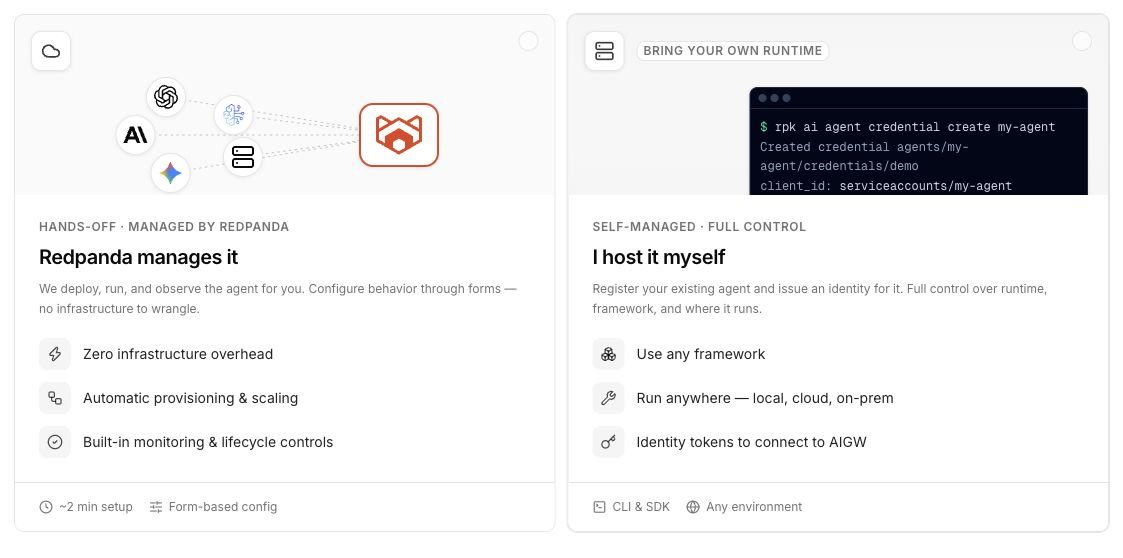
Click I host it myself, so Agentic Data Plane registers the agent as an identity and leaves the runtime to you.
-
Fill in the identity fields on the Register self-managed agent canvas, then click Create agent:
-
Name: Required. Human-readable name shown in the agent list and detail header. Agentic Data Plane derives the agent’s resource ID from this name when you register the agent; you don’t enter the ID directly. The derived ID is used in URLs, in cost-attribution queries, and as the agent’s resource identifier, and it can’t be changed after creation.
-
Description: Optional. Up to 1024 characters. An internal note shown on the agent’s detail page.
-
Tags: Optional key/value pairs to organize and filter agents. Expand the Advanced area to add them.
-
The agent opens on its detail page with a Self-managed type badge. A self-managed agent carries no provider, model, or tool configuration of its own: it is an identity that calls the organization’s shared gateway resources.
Issue a client secret
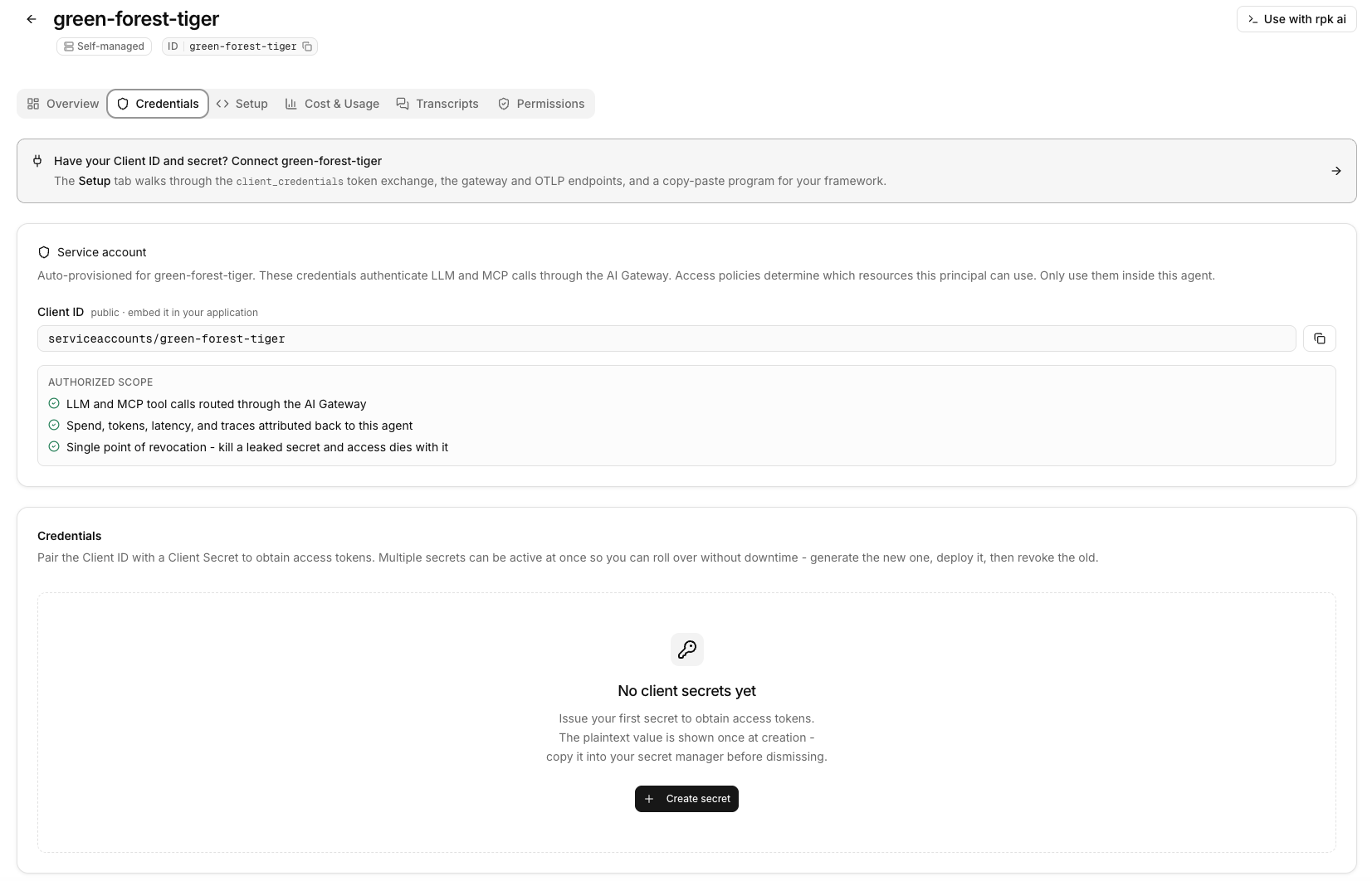
Agentic Data Plane provisions a service account for the agent at registration. To authenticate the agent’s calls, issue an OAuth 2.0 client secret on the agent’s Credentials tab.
-
Open the agent’s Credentials tab.
-
Note the Client ID. It has the form
serviceaccounts/<agent-id>, where<agent-id>is the agent’s identifier. The Client ID is public and stable: every secret on the agent shares it. -
Click Create secret.
-
Optionally enter a Name to identify the secret in the list and in audit logs, for example,
production. If you leave it blank, Agentic Data Plane assigns a default name such assecret-1. -
Click Generate secret.
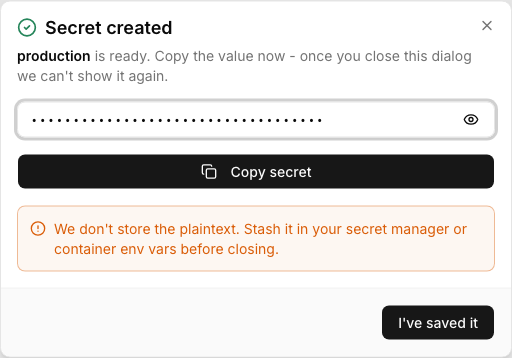
Agentic Data Plane shows the plaintext Client secret one time.
-
Copy the secret into your secret manager or container environment variables, then click I’ve saved it.
|
The client secret is shown only at creation. Agentic Data Plane stores a hash and cannot show the plaintext again. Each secret expires 90 days after creation. To rotate without downtime, create a new secret, deploy it, and then revoke the old one with Revoke on its row in the secrets list. |
Connect your agent to the AI Gateway
The agent’s Setup tab generates everything your code needs: the gateway endpoints, an environment-variable block, a copy-paste SDK sample for your framework, and the commands to install its dependencies and run it. The install command lists every package the sample imports, so the sample runs without your adding any by hand. Open the Setup tab, pick your framework at the top, then work through the tab’s steps in order:
-
Create a credential: The same client secret you issued on the Credentials tab, embedded in the step. One credential authorizes the agent’s LLM calls through the gateway, its tool calls to MCP servers, and its span exports.
-
Wire up your framework: Copy the environment-variable block and the generated sample. Select the LLM provider, and optionally the MCP servers, the sample connects through; your selection fills in the values without changing the agent. The same block configures the OpenTelemetry exporter that streams the agent’s spans (see Stream transcripts).
-
Check it works: Run the generated shell request. It mints a token and calls the gateway, so a failure here is the wiring and not your program. The validation log beneath it reports what happened to any spans the agent exported.
If your environment doesn’t run the trace-ingestion endpoint, step 2 says so: the gateway half of the setup works as written, but exported spans have nowhere to land until transcripts are available there.
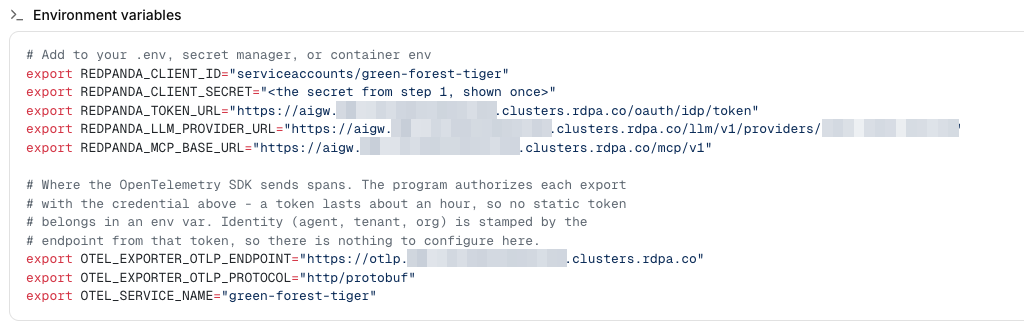
In the endpoint URLs below, <cluster-id> is your cluster’s identifier and <gateway-base> is https://aigw.<cluster-id>.clusters.rdpa.co. Copy the exact values from the Setup tab.
Authenticate with the client credential
The gateway runs its own OAuth 2.0 identity provider. Unlike model providers that issue one static, long-lived API key, the gateway issues short-lived access tokens, so your code mints a token and refreshes it as it runs rather than reading a key from an environment variable. Exchange the Client ID and client secret for an access token with the client_credentials grant against the token endpoint:
<gateway-base>/oauth/idp/tokenSend the resulting token as an Authorization: Bearer header on every LLM and MCP request. The gateway authenticates on this token and injects the real upstream provider key itself, so your SDK’s own API-key field is a placeholder. Your client is responsible for refreshing the token before it expires.
Route LLM calls through the gateway
Point your SDK’s base URL at the provider’s gateway endpoint instead of the upstream API:
<gateway-base>/llm/v1/providers/<provider-name>In this URL, <provider-name> is the name of an LLM provider you configured in Agentic Data Plane. The gateway forwards each provider’s native API to the upstream, so you keep using the provider’s own SDK. The provider enforces a model allow-list: pick a model the provider serves, or the gateway rejects the call. For the full proxy contract and per-SDK setup, see Connect your app to AI Gateway.
Route MCP tool calls through the gateway
Point your MCP client at each server’s gateway URL, with the same bearer token:
<gateway-base>/mcp/v1/<server-name>In this URL, <server-name> is the name of an MCP server registered in Agentic Data Plane. Routing tool calls through the gateway keeps them under the same identity, governance, and observability as the model calls.
Group a session’s calls with a conversation ID
Conversations group on the gen_ai.conversation.id attribute carried by the spans your agent exports; see Stream transcripts. Optionally, you can also stamp gateway requests with the X-Redpanda-Genai-Conversation header set to the same identifier. The gateway maps the header onto gen_ai.conversation.id on its own record of each call, so the gateway’s records join the same conversation as the spans your agent exported. The header is not a substitute for instrumenting your agent: a transcript’s turns and message content come from the agent’s own spans. It does not affect authentication or whether calls succeed.
Stream transcripts
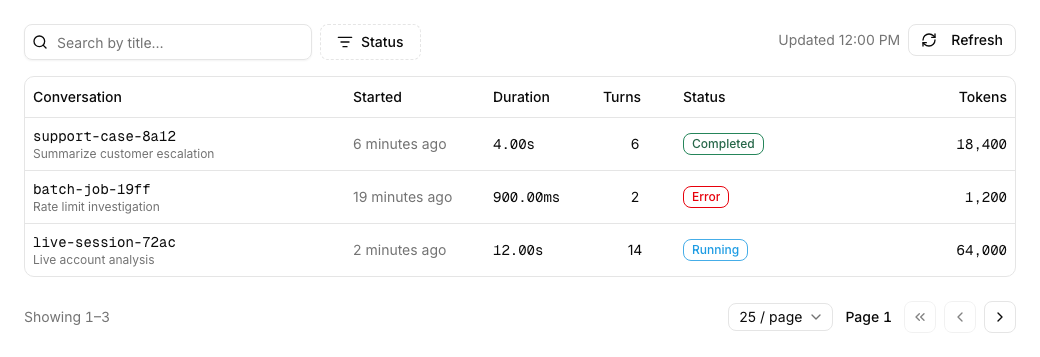
Agentic Data Plane assembles the agent’s Transcripts tab from OpenTelemetry spans your agent exports itself, not from the gateway calls alone. The Setup tab’s environment block and generated sample wire this up: a standard OpenTelemetry exporter pointed at the cluster’s OTLP endpoint (https://otlp.<cluster-id>.clusters.rdpa.co), authorized by minting short-lived tokens from the same client credential your code already uses. The sample also stamps a stable gen_ai.conversation.id attribute on every span in the session.
Agentic Data Plane reads the OpenTelemetry semantic conventions for generative AI, so a framework whose instrumentation already emits gen_ai.* attributes needs no mapping of its own. For the span attributes transcripts require, the ingestion limits, and the validation log, see Self-Managed Agent Telemetry Reference.
Each distinct gen_ai.conversation.id becomes one conversation on the Transcripts tab, grouping the exported spans that carry it into one row.
Framework samples
The Setup tab generates a ready-to-paste sample for your framework, prefilled with your selected provider and MCP servers, together with the environment-variable block and install commands it needs. Copy them from the tab rather than from another agent or an older note, so you always get the current wiring. Samples are available for Redpanda AI SDK, ADK Go, Vercel AI SDK, Mastra, LangChain, CrewAI, ADK Python, and ADK Java.
Some frameworks' instrumentation limits what a transcript can show. See Framework caveats.
| ADK Go ships only Gemini-shaped models, so the ADK Go sample works against a Google provider only. For an OpenAI or Anthropic provider, use one of the other frameworks. |
Observe the agent
Because the agent’s traffic flows through the gateway, Agentic Data Plane attributes its cost and usage without any instrumentation in your code: spend, tokens, and latency roll up to the agent, from the calls routed through the gateway. See them on the agent’s Cost & Usage tab and in budgets.
Transcripts take one more step. Routing calls through the gateway records their cost and usage, but Agentic Data Plane assembles the Transcripts tab from the OpenTelemetry spans your agent exports (wired by the Setup tab, described in Stream transcripts). When the agent streams its own spans, each session appears on the agent’s Transcripts tab. See what your agent did.
A transcript always shows token usage, latency, and tool calls; it shows prompt and response text only when the agent’s own instrumentation captures message content. The generated environment block enables capture for the frameworks that support it. See Message content capture.
Troubleshooting
| Symptom | What to check |
|---|---|
|
The Client ID or client secret is wrong, or the secret expired or was revoked. The Client ID must be the full |
|
The model is not on the provider’s allow-list. Pick a model the provider serves. The Setup tab fills in a valid model for you. |
|
The provider name in the URL does not match a configured provider. Confirm the segment after |
The Transcripts tab stays empty |
The agent is not exporting its OpenTelemetry spans, or the spans fail validation. Transcripts are assembled only from the spans the agent exports, with a stable |
A transcript shows usage but no message text |
The agent’s instrumentation is not capturing message content. Enable capture in the agent’s instrumentation (see Message content capture). Capture applies only to spans exported after the change. |
